










Click-to-open dropdowns stop menus from opening by accident and behave the same with a mouse or a finger.
The free Navigation Menu block in Nexter Blocks can open dropdowns on click instead of hover.
For every Navigation Menu setting in one place, see the Navigation Menu block guide.
Before You Start
- Edition: Free — works in Nexter Blocks (free) and with Nexter Blocks Pro.
- Block to enable: Navigation Menu, switched on under Nexter > Blocks in your WordPress dashboard.
- A menu with sub-items: Manual Menu items at 1 Level, or a WordPress menu with child items (Pro).
Steps
- Add the Navigation Menu block to your header template and set up your menu items.
- In Navigation Content, set Submenu Open to On Click.
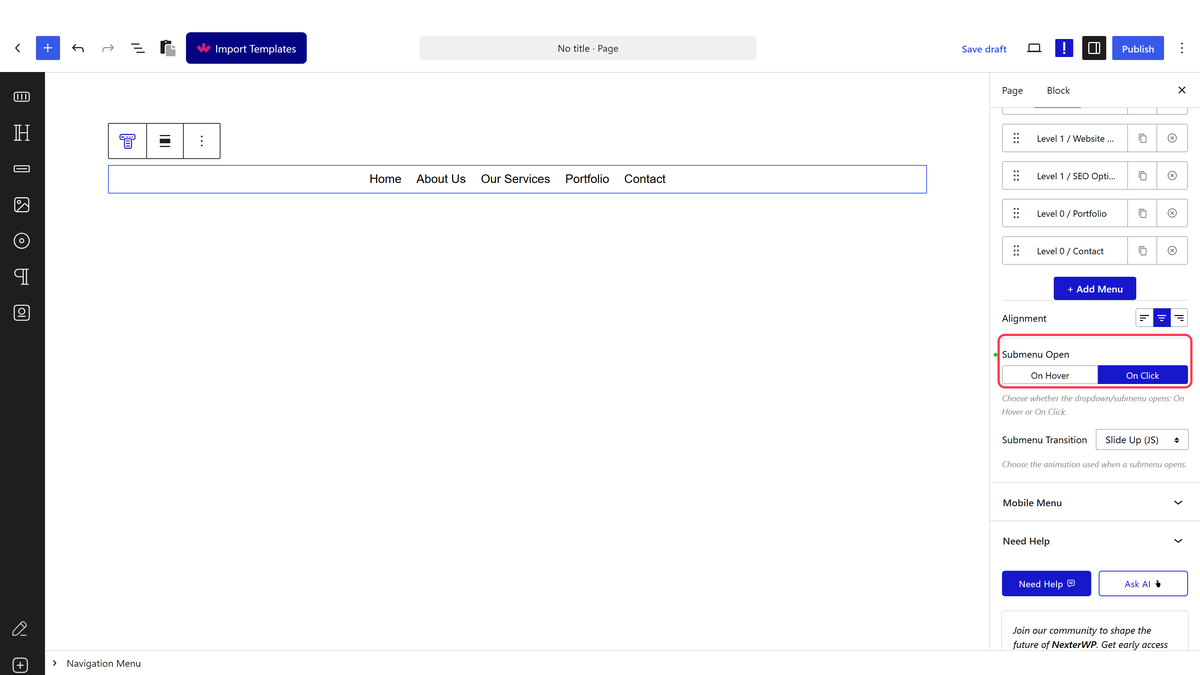
- Choose a Submenu Transition and save.

How It Behaves
- Moving the pointer over a parent item does nothing; clicking it opens the dropdown.
- It works the same for Manual Menu and WordPress Menu, in the free plugin and with Pro.
Limitations
- A parent item that opens a dropdown on click is harder to use as a link to its own page. Add that page as the first item in the dropdown.
Troubleshooting
Clicking goes to the page instead of opening the dropdown
Check that Submenu Open is set to On Click and that the item has sub-items below it.
