









Are you looking to show the WordPress dropdown menu on hover? Showing submenu on hover makes it easier for users to find the options, which improves the user experience.
With the Navigation Menu block from the Nexter Blocks, you can easily open the dropdown menu on hover in WordPress.
To check the complete feature overview documentation of the Nexter Blocks Navigation Menu block, click here.
Requirement – This block is a part of the Nexter Blocks, make sure it’s installed & activated to enjoy all its powers.
To do this, add the Navigation Menu block to the header template and follow the steps –
Note: To create the header template, you can use the free Nexter Builder.
1. Select the appropriate options from the Type and Menu Layout sections.
2. Then select or create the menu, depending on the option selected in the Type section.
3. From the Submenu Open section, select OnHover.
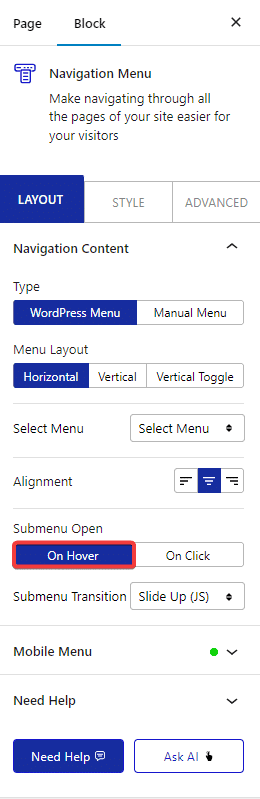
You can select the appropriate effects for the dropdown menu from the Submenu Transition dropdown.
Now, your dropdown menu will open on hover.

