










Sometimes the clearest loading screen is one that simply says what is happening.
The Text loader type puts a word or short phrase on the overlay and animates it while the page loads.
For every Pre Loader setting in one place, see the Pre Loader block guide.
Before You Start
- Edition: Pro — the Pre Loader block is part of Nexter Blocks Pro.
- Block to enable: Pre Loader, switched on under Nexter > Blocks in your WordPress dashboard.
- A short phrase: one or two words read best on a loading screen.
Steps
- Add the Pre Loader block to the page and click Design from Scratch.
- In the Pre Loader panel, click + Add Item and set Select Type to Text.
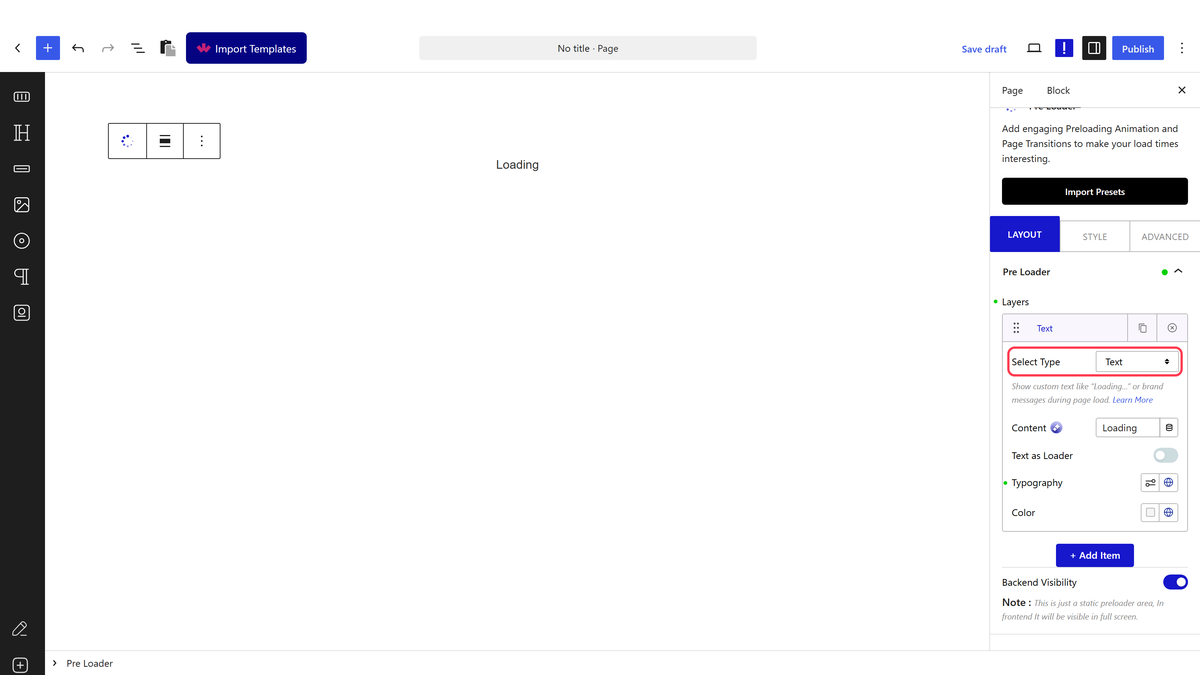
- Type the words into the item’s text field.
- Open the Style tab and set the Text padding, background and border.
- Publish the page and open it in a new tab.
The editor only shows a small static preview of the loader. On the published page it covers the whole screen until loading finishes.
How It Behaves
- Your words are rendered twice — once as the base and once inside an inner element — which is how the block animates the fill without you writing any CSS.
- Because it is real text, it scales cleanly on every screen and needs nothing downloaded.
- While the page is loading, the block adds
tpgb-body-preloaderto the page and shows the overlay. Once loading finishes it swaps intpgb-loadedand the overlay goes away. - Padding, background, border and shadow live in the Text panel of the Style tab.
Limitations
- Pro only.
- Long sentences do not fit the animation well — keep it to a word or two.
- The text is duplicated in the markup for the animation, so do not use it for anything a visitor must read only once.
- The editor shows only a static preview of the loader area.
Troubleshooting
Nothing shows on the overlay
The item’s text field is empty. A Text item with no words renders nothing at all.
The text appears twice
That is how the animation is built — a base copy and an animated copy stacked on top. Only one is visible at a time on the published page.
The words wrap awkwardly
Shorten the phrase, or reduce the font size in the Text panel of the Style tab.
