










A vertical menu suits sidebars, side headers and small menus where a stacked list looks cleaner than a row.
The free Navigation Menu block in Nexter Blocks switches to a vertical layout with one setting.
For every Navigation Menu setting in one place, see the Navigation Menu block guide.
Before You Start
- Edition: Free — works in Nexter Blocks (free) and with Nexter Blocks Pro.
- Block to enable: Navigation Menu, switched on under Nexter > Blocks in your WordPress dashboard.
Steps
- Add the Navigation Menu block and choose a Type (Manual Menu, or WordPress Menu with Pro).
- Set Menu Layout to Vertical.
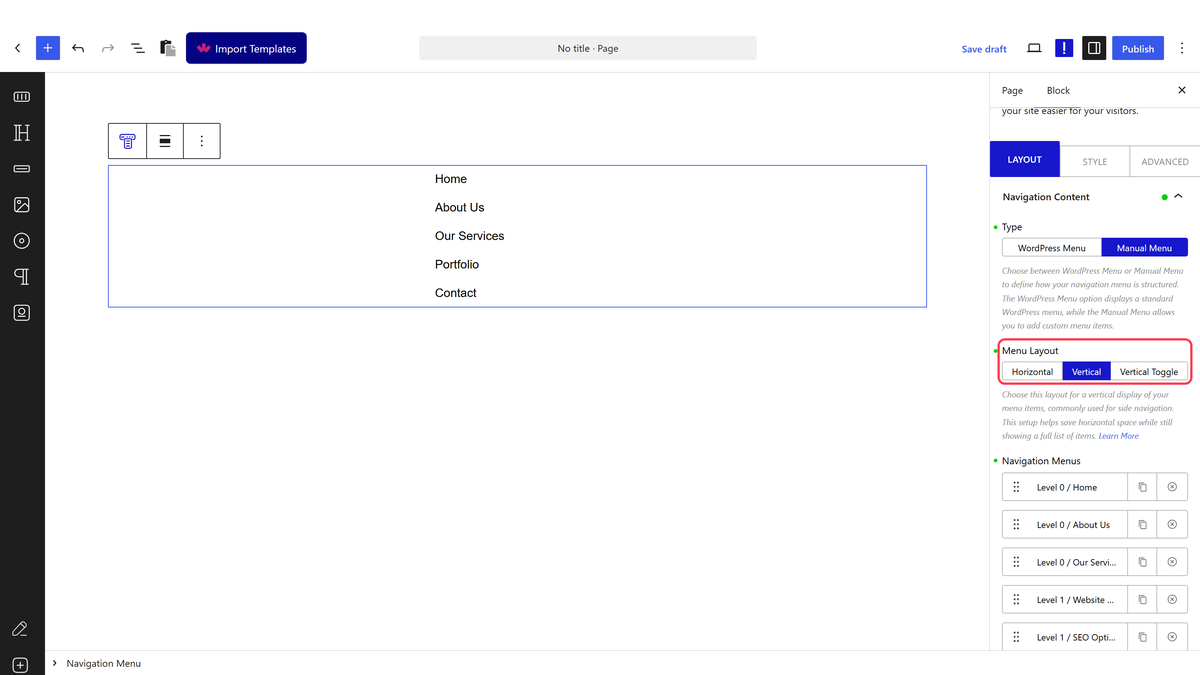
- Add or select your menu items, then set Submenu Open and Submenu Transition. Save.

How It Behaves
- Menu items are stacked top to bottom.
- Opening a parent item shows its sub-items below it and pushes the items underneath down.
Limitations
- Long vertical menus take a lot of height. For a collapsible version, use the Vertical Toggle layout.
Troubleshooting
The menu is still in a row
Check Menu Layout is set to Vertical and the block has enough width for the item text.
