










A ring in the corner of the screen is a small, familiar shape — and it draws itself as your visitor scrolls.
The Circular type is a real SVG ring, not a rotated bar, sitting in one corner of the screen and filling clockwise.
For every Dynamic Device setting in one place, see the Progress Tracker block guide.
Before You Start
- Edition: Free — the Progress Tracker block works in Nexter Blocks (free) and Nexter Blocks Pro.
- Block to enable: Progress Tracker, switched on under Nexter > Blocks in your WordPress dashboard.
- The bar is fixed to the screen, not the page. It stays in place as you scroll, pinned to the edge you choose — that is what makes it a reading indicator rather than a static graphic.
Steps
- Add the Progress Tracker block anywhere on the page.
- Choose a Type: Horizontal, Vertical or Circular.
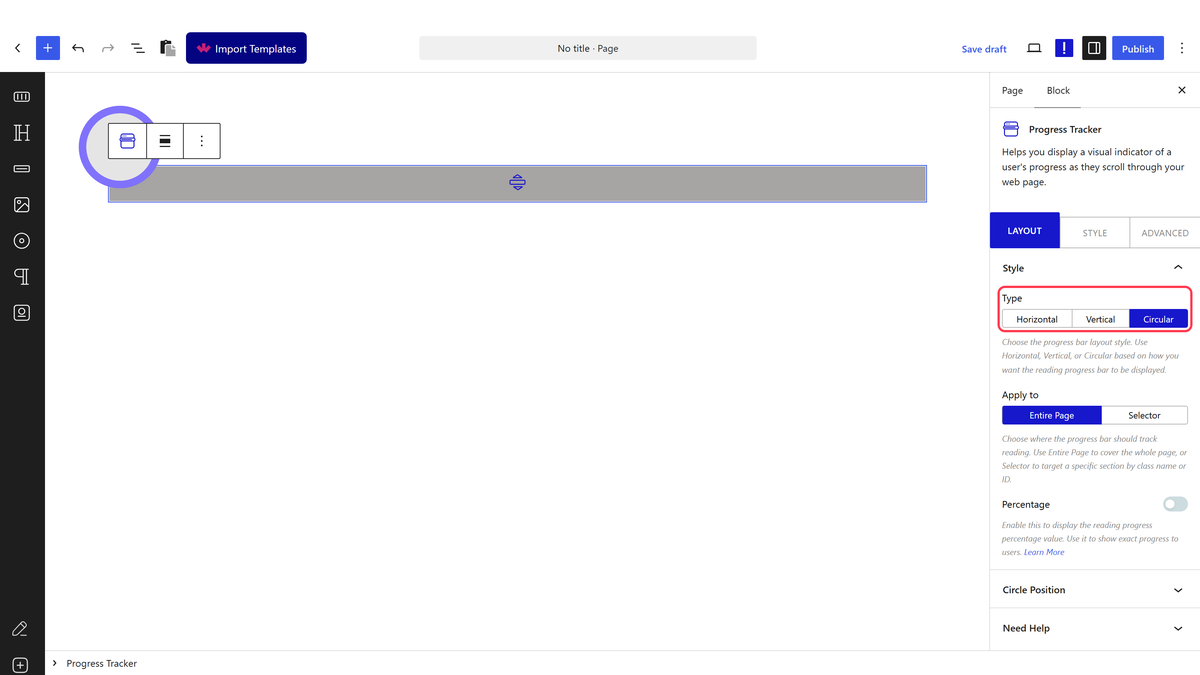
- Set Circle Position to one of the four corners.
Measured proportional to scroll: the ring’s own stroke offset moved exactly in step with how far down the page the visitor had scrolled.
How It Behaves
- It is a genuine SVG ring, drawn with
stroke-dashoffset— not a rotated bar or a background trick, so it stays crisp at any size. - Position only offers the four corners, unlike Horizontal and Vertical’s edge positions.
- Percentage still works, showing a live number in the middle of the ring.
- Pin Point does not work on Circular — measured, no markers render, since the corner ring has nowhere linear to place them. See the Pin Point guide.
Limitations
- No Pin Point support — measured, the setting has no effect here.
- A ring in a corner is easy to overlook on a first visit; consider Percentage text to make it more obviously a progress indicator.
- A section-scoped bar still needs a section taller than the screen, the same as every type — see the section guide.
Troubleshooting
The ring never fills
Check the page is actually taller than the screen. If Apply to points at a section, confirm that section is taller than the viewport — see the section guide.
I want clickable steps on my circular bar
Pin Point does not render on Circular — measured. Use Horizontal or Vertical instead if step markers matter more than the ring shape.
The ring overlaps other fixed content in that corner
Switch Circle Position to a different corner, or add spacing under Advanced.
