










Do you want to search for WooCommerce products by category in WordPress? Organizing products into categories and searching by categories, makes it easier for customers to navigate and find what they are looking for.
With the Search Bar block from the Nexter Blocks, you can easily allow users to search WooCommerce products by category in WordPress.
To check the complete feature overview documentation of the Nexter Blocks Search Bar block, click here.
Requirement – This block is a part of the Nexter Blocks, make sure it’s installed & activated to enjoy all its powers.
To do this, make sure you’ve added some products to your WooCommerce store.
Then, add the Search Bar block on the page or template and follow the steps –
1. Open the item under Search Bar and select Taxonomy from the Source section.
2. From the Select Taxonomy dropdown, select Product categories.
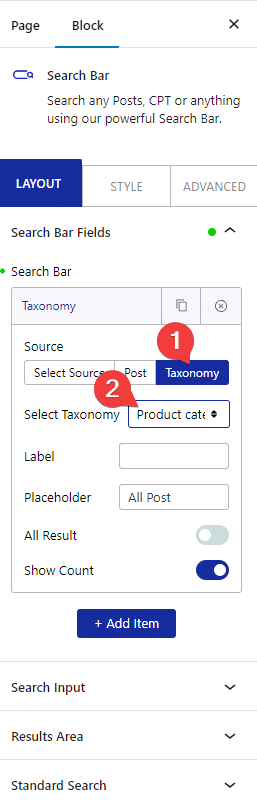
Now, you should be able to see a dropdown beside the search bar.
In the Label field, you can add a label name for the select dropdown.
In the Placeholder field, you can add a placeholder text for the select dropdown.
You can show all the search results on load by enabling the All Result toggle.
From the Show Count toggle, you can show the number of products the item has in numbers.
3. Now go to Extra Option tab and enable the AJAX Search toggle.
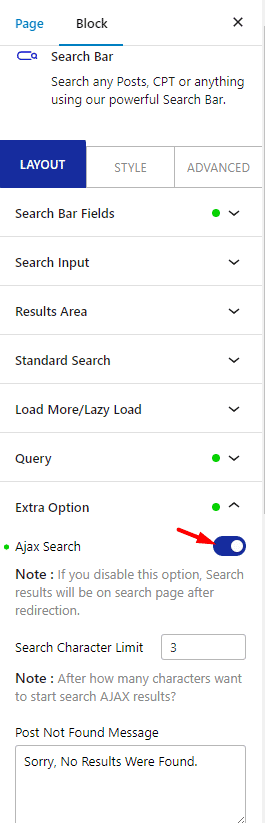
Now you can select a product category from the dropdown to show all the products in that category or you can directly search for products within the category as well.
