










A custom underline or highlight draws attention to a key phrase in a heading.
The Advanced Typography block in Nexter Blocks Pro has classic and animated overlay underlines.
For every Advanced Typography setting in one place, see the Advanced Typography block guide.
Before You Start
- Edition: Pro — Advanced Underline needs Nexter Blocks Pro.
- Block to enable: Advanced Typography, switched on under Nexter > Blocks in your WordPress dashboard.
Steps
- Add the Advanced Typography block, keep Normal and type your text in Content.
- On the Style tab, open Advanced Underline.
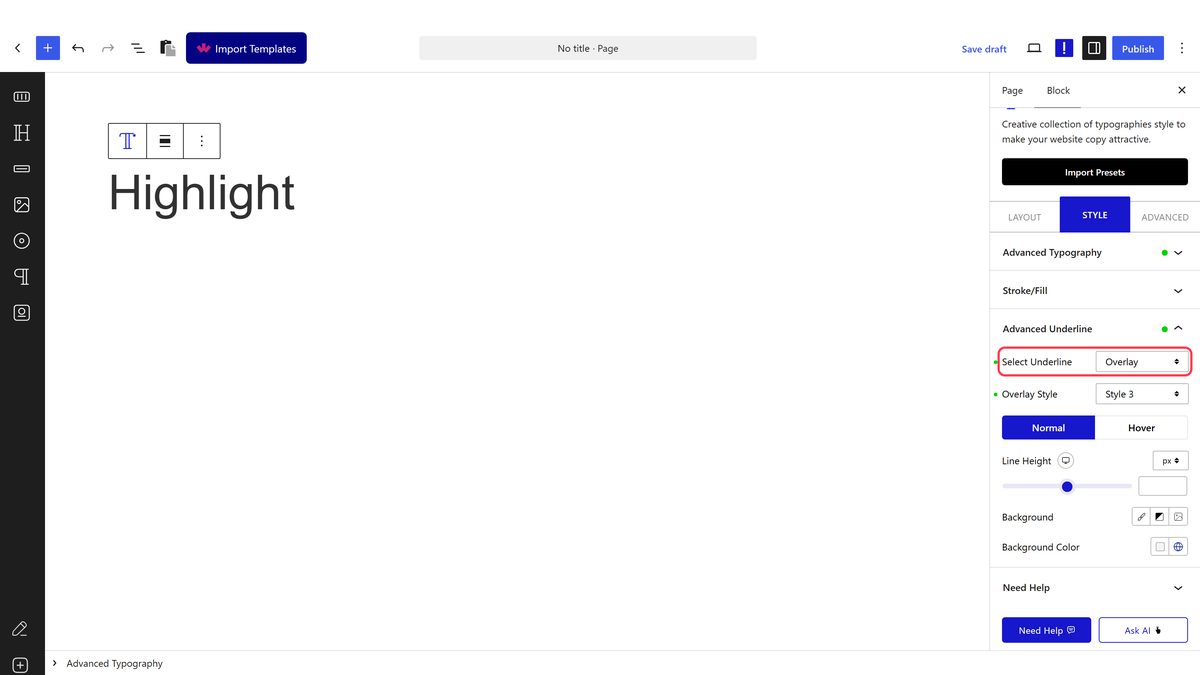
- Under Select Underline, choose Classic or Overlay.
- For Overlay, pick an Overlay Style and set a Background colour on the Normal and Hover tabs. For Classic, set Line Type, Line Style and Line Color. Save.
Underline Types
| Type | Settings | Result |
|---|---|---|
| Classic | Line Type (Underline, Overline, Line Through), Line Style (Solid, Double, Dotted, Dashed, Wavy), Line Color, for Normal and Hover | A standard text decoration line |
| Overlay | Overlay Style 1–7, Bottom Offset, Line Height, Background, for Normal and Hover | A highlight bar drawn under or behind the text that can change on hover |
How It Behaves
- Overlay styles draw a separate bar, so they can be thicker than a normal underline and animate on hover.
- With Multiple, each text item has its own Advanced Underline, so you can highlight a single word.
Limitations
- The overlay bar is red by default. Set a Background colour to match your design.
- The Advanced Underline panel on the Style tab is for Normal text; Multiple uses the per-item settings.
Troubleshooting
A red line appears under my text
That is the default overlay colour. Set Background on the Normal and Hover tabs.
