










Conditional logic shows visitors only the fields that matter to them, so forms stay short and clear.
The free Form block in Nexter Blocks can show or hide any field based on a Radio Button or Checkbox answer.
For every Form setting in one place, see the Form block guide.
Before You Start
- Edition: Free — works in Nexter Blocks (free) and with Nexter Blocks Pro.
- Block to enable: Form, switched on under Nexter > Blocks in your WordPress dashboard.
- A Radio Button or Checkbox field in the form. Conditions can only check these two field types.
Add the Field That Controls the Condition
- Add a Radio Button or Checkbox field to your form.
- Add its options. For each option, the first box is the label visitors see and the second is the value.
Set the Condition
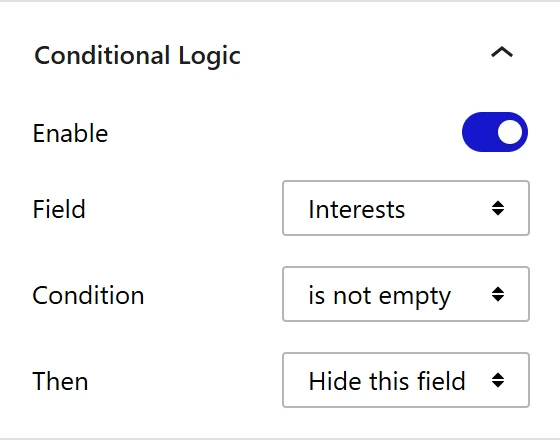
- Select the field you want to show or hide and open Conditional Logic.
- Turn on Enable and choose the Radio Button or Checkbox in Field.
- Pick a Condition and a Value, then choose Show this field or Hide this field in Then. Save.
Available Conditions
| Field | Conditions |
|---|---|
| Radio Button | is, is not, is empty, is not empty |
| Checkbox | contains, does not contain, is empty, is not empty |
Value is not needed for is empty and is not empty.
How It Behaves
- The field updates as soon as the visitor changes their answer.
- A hidden field is not required and its value is not sent, so it never blocks submission and is left out of emails.
- Values are compared without regard to upper or lower case.
- Conditions work across steps in a multi step form (Pro).
Limitations
- Only Radio Button and Checkbox fields can drive a condition.
- Each field has one condition.
- Hidden Field, Submit and Security Code cannot be shown or hidden with conditions.
Troubleshooting
The Conditional Logic panel says to add a radio or checkbox field
Add a Radio Button or Checkbox field to the same form first.
The field never appears
Check the Value matches one of the options and that Then is set to Show this field.
