










Autoplay is the setting people argue about. It shows visitors there is more to see; it also moves content out from under them while they are reading it.
This page covers what the settings do, measured, so you can make that call deliberately — starting with the fact that it is already on.
Before You Start
- Edition: Pro — the Carousel Anything block needs Nexter Blocks Pro.
- Block to enable: Carousel Anything, switched on under Nexter > Blocks in your WordPress dashboard.
- A Carousel Anything block with several slides — see the Carousel Anything guide.
- Test with several slides. A carousel with one slide has nothing to move to, so most settings will look broken when they are simply idle.
Autoplay is on by default. Measured on a published page, a carousel with nothing configured already moves, on a 1500 millisecond interval.
Steps
- Select your Carousel Anything block.
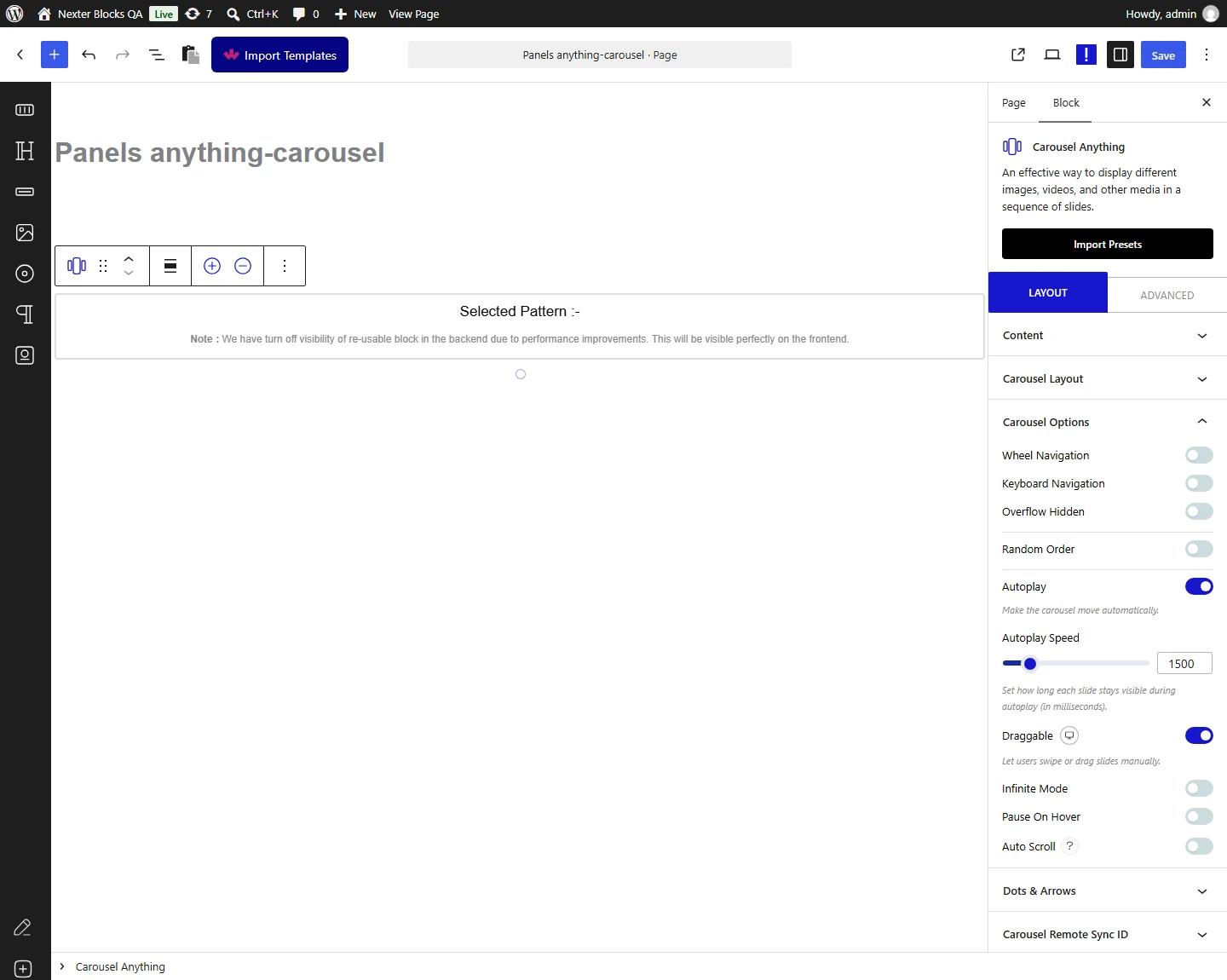
- Switch autoplay on or off deliberately, rather than leaving it.
- Set the interval — how long each slide is held.
- Set the transition speed — how long the movement itself takes.
- Switch pause on hover on, so a reader can stop it.
- Switch infinite loop on as well, or it will stop at the last slide.
- Publish and watch the real page.
How It Behaves
Four separate settings feed the carousel configuration, and they are easy to confuse.
- Autoplay is on unless you turn it off. Measured: an untouched carousel rendered
autoplay: truewithinterval: 1500. Switching it off renderedautoplay: false. - Interval and speed are different things. Measured with an interval of 2500 and a speed of 800:
interval: 2500is the pause on each slide,speed: 800is how long the slide takes to move. - Pause on hover is off by default. Measured: switching it on rendered
pauseOnHover: true. - Autoplay and loop are separate settings. Without loop the carousel autoplays to the last slide and stops — see the infinite loop guide.
- Every setting ends up in one place. The block writes its whole configuration into a
data-splideattribute on the carousel, which is what the slider script reads. If a setting is not doing what you expect, that attribute is where to look. - Measured with Nexter Blocks Pro deactivated: the carousel renders nothing at all — no wrapper, no configuration and no slides. This is a Pro-only block.
Limitations
- Pro only — measured with Nexter Blocks Pro deactivated, nothing renders.
- Autoplay is an accessibility problem. Content that moves on its own is difficult for people who read slowly, use magnification, or have vestibular conditions. If you keep it, keep pause on hover on.
- A fast interval makes content unreadable. Anything under about four seconds is too quick for a slide with a sentence on it.
- Hover does not exist on touch screens, so pause on hover protects desktop visitors only.
- An autoplaying carousel still hides content. Movement does not mean slide four gets read.
Troubleshooting
My carousel moves and I never switched it on
Autoplay is on by default. Measured, an untouched carousel renders autoplay: true. Switch it off.
It stops after the last slide
Loop is off. Autoplay and loop are separate — switch loop on too.
Changing the speed does nothing
Check which setting you changed. The interval is the pause on each slide; the speed is the movement itself. Measured, they render as interval and speed respectively.
It does not pause when I hover
Pause on hover is off by default. Switch it on.
It keeps moving while I am reading
Raise the interval, or switch autoplay off. This is the most common complaint about carousels.
