










The metro presets cover the usual shapes, but they decide for you which tile is large and where it sits.
A custom metro pattern lets you describe the arrangement yourself, tile by tile.
Before You Start
- Edition: Pro — custom metro patterns needs Nexter Blocks Pro.
- Block to enable: Post Listing, switched on under Nexter > Blocks in your WordPress dashboard.
- Enough posts to see the effect. A listing with three posts cannot show pagination, filtering or a second row.
- A settled post count, because the pattern is built around it.
Steps
- Select your Post Listing block and set the layout to metro.
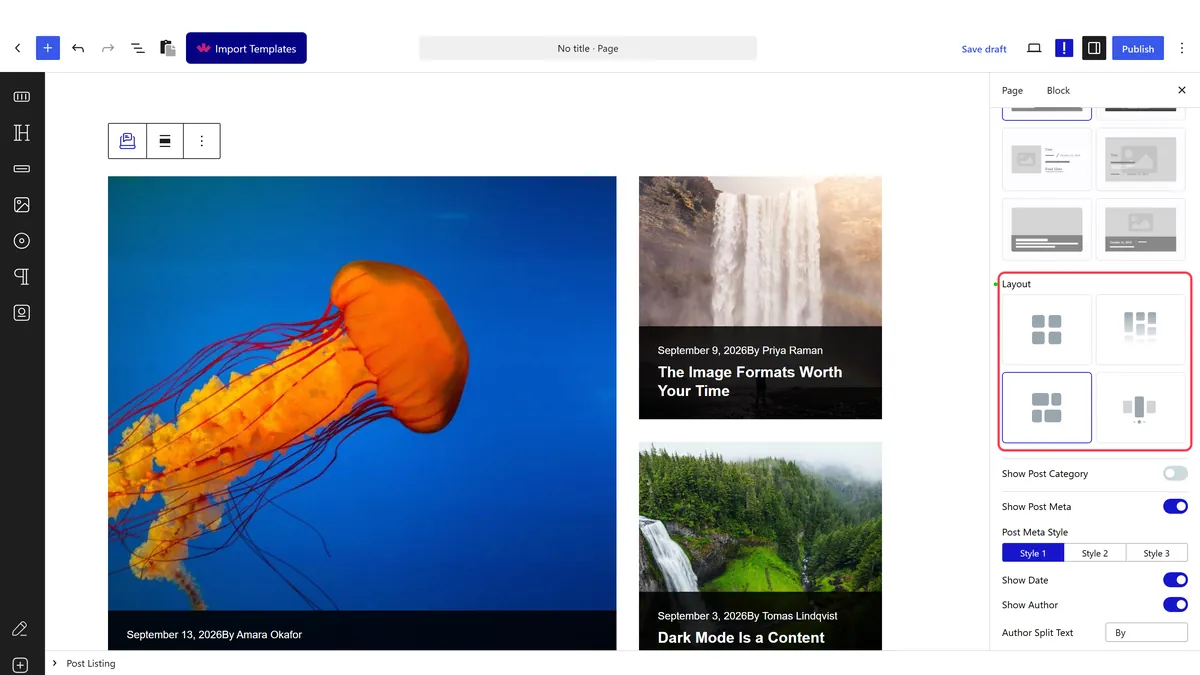
- Change the metro style to the custom option.
- Describe your pattern, giving each tile its width and height.
- Set a simpler pattern for tablet and phone.
- Publish and check that the post count fills the pattern.
How It Behaves
The custom pattern is carried in the same attribute as the preset styles.
- Measured on a published page: a custom metro still rendered
data-layout="metro"withdata-metroAttrcarrying the style and column values, exactly as a preset does. - Each device keeps its own pattern, measured as separate desktop, tablet and mobile values in that attribute.
- The pattern and the post count have to agree. The block does not stretch tiles to fill a gap, so a pattern expecting seven posts with only five shown leaves holes.
- Featured images are CSS backgrounds, the same as the preset metro layouts — see the metro layout guide.
- Measured with Nexter Blocks Pro deactivated: this stops working. The block still renders a plain list of posts, so there is no error to see — just the feature quietly missing.
Limitations
- Pro only — measured with Nexter Blocks Pro deactivated, metro falls back to ordinary grid items.
- It is fiddly by nature. A custom pattern is a description of a layout, so it takes trial and error.
- Patterns rarely translate down a screen size. What works on desktop usually has to be simplified for tablet and abandoned for phone.
- Changing the post count breaks the pattern, so settle the count first.
- The same alt-text limitation applies as with preset metro layouts.
Troubleshooting
There are holes in my layout
The pattern expects more posts than the listing shows. Match the post count to the pattern.
My pattern is ignored
The metro style has to be set to the custom option rather than left on a preset.
It is unreadable on mobile
Set a much simpler pattern at the phone breakpoint, or drop to a single column there.
Nothing renders as metro at all
Check Nexter Blocks Pro is active. Measured with Pro off, the metro classes are absent.
