










Scrolling text catches the eye for announcements, offers and ticker-style strips.
The Advanced Typography block in Nexter Blocks Pro makes any text scroll with its Marquee settings.
For every Advanced Typography setting in one place, see the Advanced Typography block guide.
Before You Start
- Edition: Pro — Marquee text needs Nexter Blocks Pro.
- Block to enable: Advanced Typography, switched on under Nexter > Blocks in your WordPress dashboard.
Steps
- Add the Advanced Typography block and type your text in Content.
- Open Marquee and turn on Marquee.
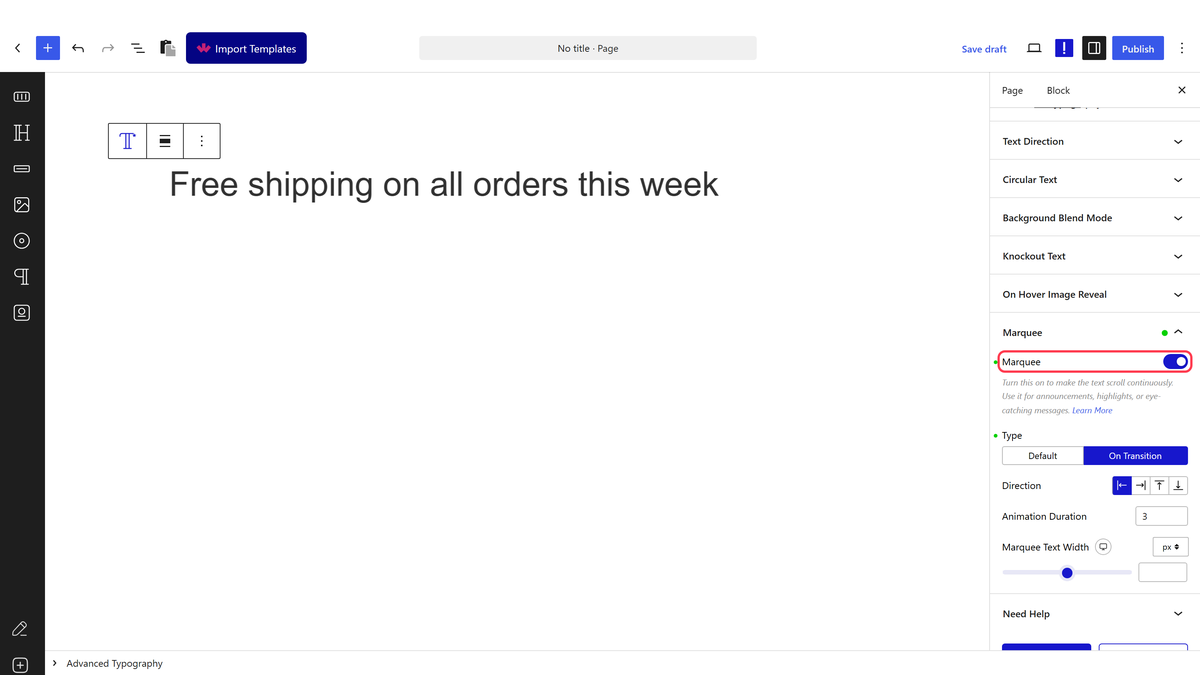
- Choose a Type: On Transition (CSS animation) or Default (browser marquee element).
- Set Direction, then the speed settings below and Marquee Text Width. Save.

Marquee Settings
| Setting | Default type | On Transition type |
|---|---|---|
| Direction | Left, Right, Up or Down | Left, Right, Up or Down |
| Behavior | Scroll (loops), Slide (stops at the end) or Alternate (bounces) | — |
| Loop | Number of passes; -1 repeats forever | — |
| Scroll Amount | Distance per step; higher is faster | — |
| Animation Duration | Delay between steps; lower is smoother and faster | Seconds for one pass (default 3) |
| Marquee Text Width | Width of the scrolling area | Width of the scrolling area |
How It Behaves
- Default uses the browser’s marquee element, which is obsolete in HTML but still works in current browsers.
- On Transition moves the text with a CSS animation. It is the safer choice for new pages.
- With Multiple, each text item has its own Marquee settings in Extra Options.
Limitations
- Behavior, Loop and Scroll Amount only affect the Default type.
- Constant motion can distract or bother some visitors. Keep marquee text short and use it sparingly.
Troubleshooting
The text scrolls too fast
For Default, lower Scroll Amount. For On Transition, raise Animation Duration.
