










A parent link in the breadcrumb lets visitors jump back one level, for example from a Web Design page to Services, without using the browser’s back button.
The free Breadcrumbs block in Nexter Blocks shows every parent page between Home and the page you are on.
For every Breadcrumbs setting in one place, see the Breadcrumbs block guide.
Before You Start
- Edition: Free — works in Nexter Blocks (free) and with Nexter Blocks Pro.
- Block to enable: Breadcrumbs, switched on under Nexter > Blocks in your WordPress dashboard.
- Pages with a parent: the trail can only show parents that exist, so set a parent page in each page’s settings first.
Steps
- Open the page, header template or single template where the trail should appear, add the Breadcrumbs block and click Design from Scratch.
- On the Layout tab, open Visibility and check that the first Parent switch is on. It is on by default.
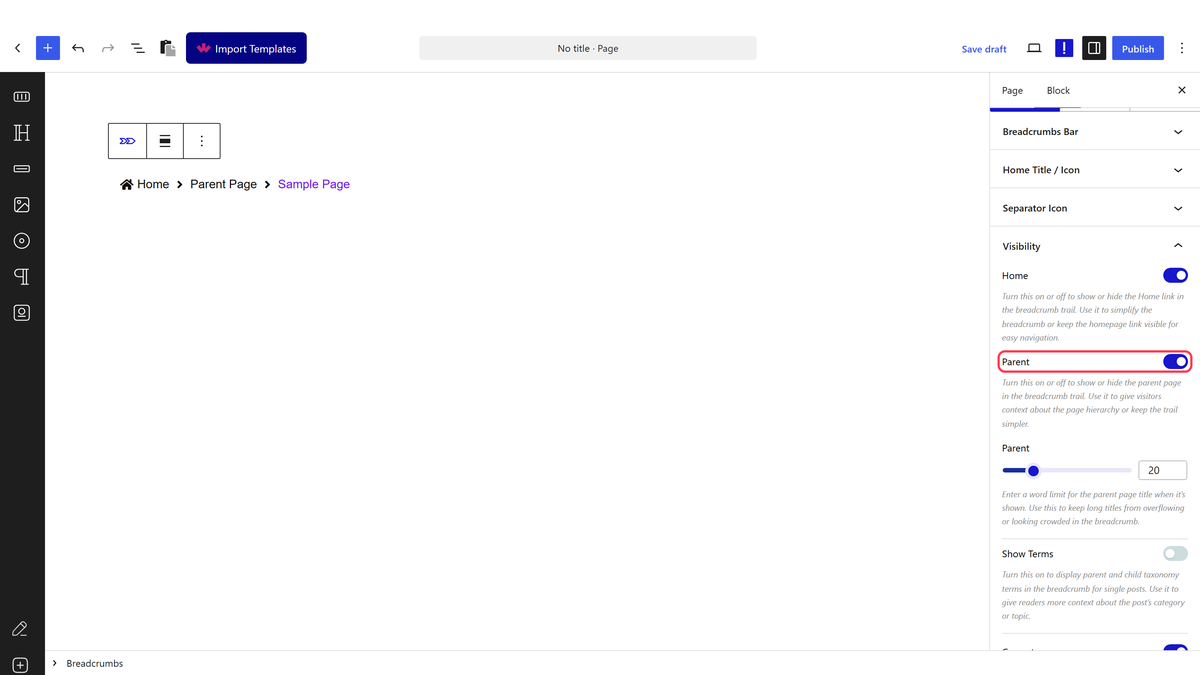
- Under that switch, the second Parent setting sets how many characters of each parent title show. The default is 20. Drag it to 100 to show full titles.
- Save, then open the page on your site. The editor shows a sample trail, not your real pages.

Parent Settings
| Setting | What it does | Default |
|---|---|---|
| Parent (switch) | Shows or hides all parent crumbs between Home and the current page | On |
| Parent (number) | Cuts each parent title to this many characters, with no ellipsis (0–100) | 20 |
| Current (switch) | Shows or hides the current page at the end of the trail | On |
| Current (number) | Cuts the current page title to this many characters | 20 |
How It Behaves
- On a page, the trail is Home, then every parent page from the top level down, then the current page.
- Each parent crumb links to its page. The current page is plain text, not a link.
- On a blog post, the parent part is the post’s category path instead of parent pages.
- With the first Parent switch off, the trail shows only Home and the current page.
- It works the same in the free plugin and with Nexter Blocks Pro, on the Nexter theme and on block themes such as Twenty Twenty-Five.

Limitations
- The limit counts characters, not words. The help text under the setting says “word limit”, but a limit of 20 cuts “WordPress Website Design” to “WordPress Website De”.
- Do not set a limit to 0. A Parent limit of 0 leaves every parent crumb as an empty link, and a Current limit of 0 hides the current page. Use 100 to show full titles.
- Cut titles end abruptly, without “…”.
Troubleshooting
Only Home and the page title show
The page has no parent page, or the first Parent switch in Visibility is off.
Parent names are cut off
Raise the second Parent setting. 100 shows titles up to 100 characters in full.
The breadcrumb links are empty
The Parent or Current limit is set to 0. Set it to a number above 0, such as 100.
